GoodSAM
Join Us
GoodSAM Instant On Scene

Your control room, on scene in seconds

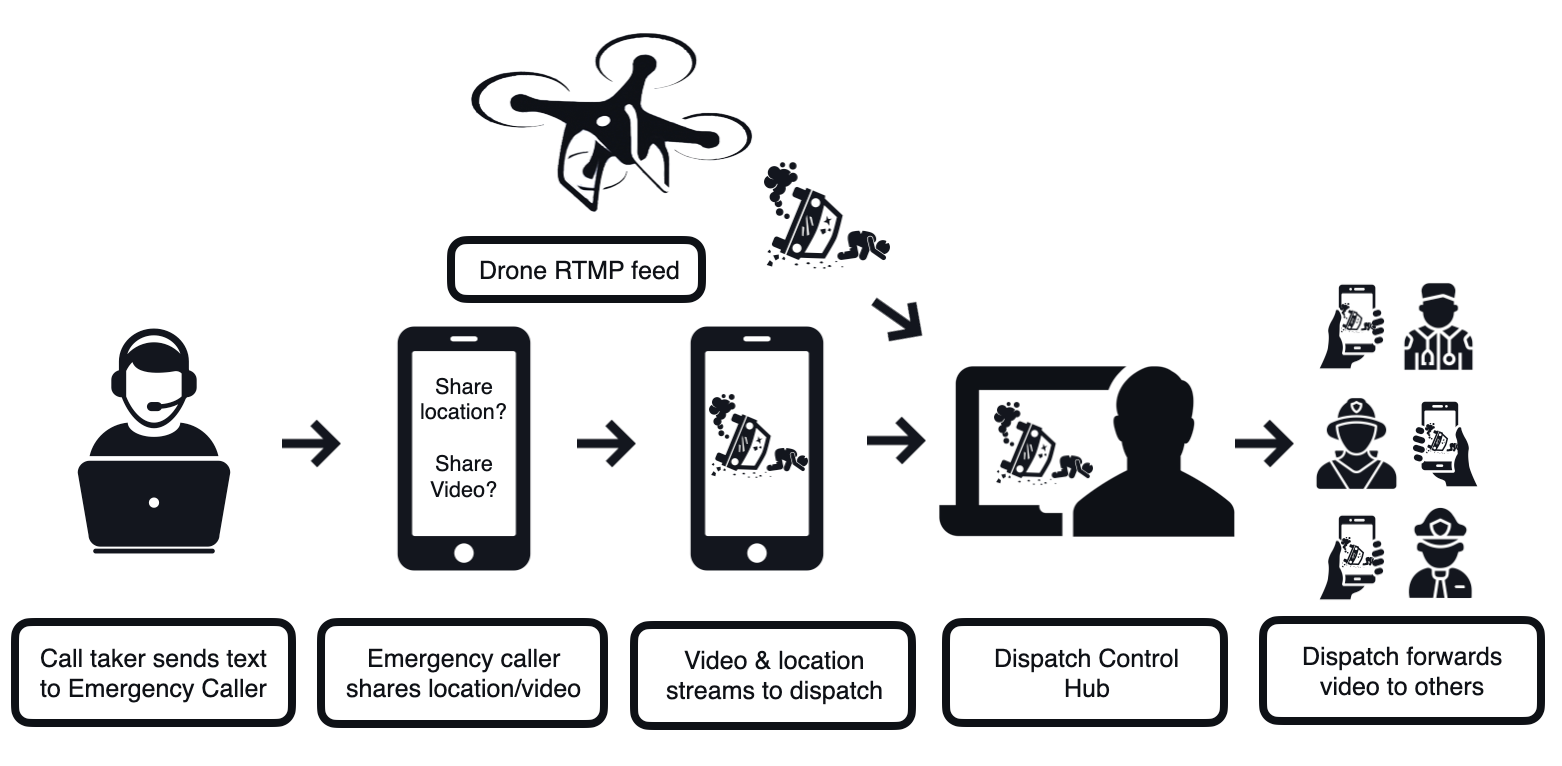
Text the caller a link. One tap and their phone camera streams into your console with their location - no app, no account, no download. Then work their camera from your desk: zoom, torch and switch, live.

Book a Demo Request Pricing
No app, no account Live location Remote zoom & torch Evidence-grade storage
The caller's side

Built for someone on the worst day of their life

Big buttons, plain words and nothing to install. If the camera is blocked, the page shows them how to allow it on their own phone - and whatever you change, it tells them.

1The text arrivesYour words, your sender ID, one link.
2One permissionThe camera only. Their voice stays on the call.
3Live, with their own controlsZoom, torch, switch camera and End video.
4Ended when you end itOr straight on to your organisation's own page.
One console, six requests

Ask for exactly what the call needs

Each request is a single link. Send one or several from the same incident, and every answer lands on the same console.

Request Video

The caller's back or front camera, live in your console, with their location.

Request Location

Their position, accuracy, heading and speed - no camera needed.

Request Attachment

Photos, videos, audio and PDFs, several at once, up to 5 GB each.

Message / Chat

A one-off message, or a live chat with replies, attachments and dictation.

Deploy Agent

An AI agent takes the first account by chat and escalates to an operator.

Consultation

A video call with several people, now or at a booked time.

Also on the console:CCTV / External FeedPathway calls from the publicYour own sender IDReferences checked against your formats
AI agents

An AI agent takes the first account, day and night

Deploy an AI agent by chat and it asks the questions, asks for photos and escalates the moment a person is needed. Type into the chat and you take over - the agent steps aside.

Escalation you can see. An Escalated pill on the tile when an operator is needed now.

A summary waiting. The AI summary is in the chat panel before you read a line.

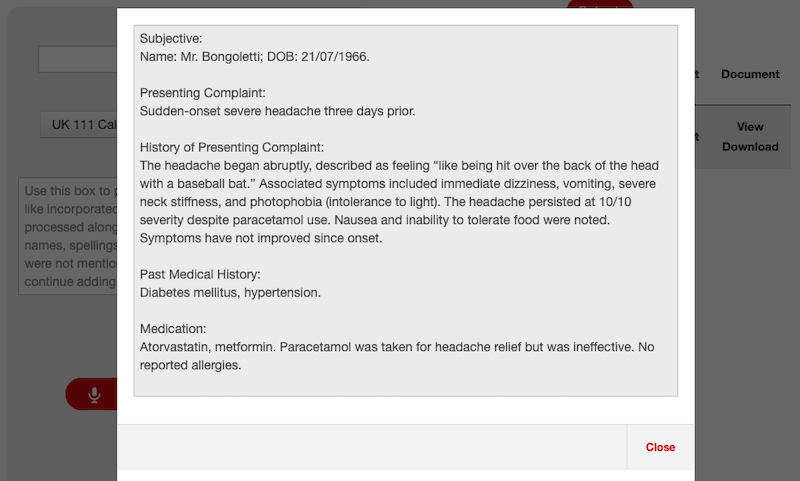
Documents afterwards. Turn a recording's transcript into a written document from the templates you approve.

Explore GoodSAM AI
Vitals

Heart rate and breathing from the phone they already hold

Switch vitals on and the caller is asked to lie the patient down and rest the phone just below where the ribs meet. The phone's motion sensor does the rest, and the readings reach your console every few seconds.

Heart rate and respiration. With live traces you can watch.

An estimated blood pressure. Labelled Est. BP - an estimate, never a measurement.

On any mobile session. Video, location, attachment and chat requests alike.

GoodSAM Meter
Lie the patient on their back. Lay the phone flat just below where the ribs meet. Press Start.
88bpmHeart rate
17/minRespiration
126/81mmHgEst. BP
Measuring...
Video consultations

When one camera is not enough, bring everyone in

Start a video consultation now or book it for later, with reminders and a calendar invite. Clinicians, interpreters and specialists join the same call from a link or the GoodSAM app.

Pathways. Let the public start a consultation themselves, inside your opening hours, ringing the team on duty.

Live captions. Transcribed as people speak and translated for each listener, when your organisation switches it on.

Send & Sign. Send documents for a real on-screen signature during the call, time and IP stamped.

Send & Sign

Get documents signed on the spot

Send statements, consent forms or prescriptions to anyone by SMS or email - up to 20 files at once, 5 GB each - and get a real on-screen signature back, stamped with the time and the signer's IP address. Send them from the recordings page, or in the middle of a video consultation.

Signed before or after reading. Ask for a signature to open the files, after reviewing them, or both.

Fields where you want them. Place signatures, initials, dates and printed names on PDF, Word and image files.

View-only when it matters. Prevent download and they read the pages in their browser.

A certificate with every send. Each file's name, size, MD5 and SHA-256, beside the signed copy.

Drones, bodycams & CCTV

Every camera at the scene, on one screen

Drones, bodycams and CCTV stream into the same console as your callers and crews, side by side - and can be recorded into the same evidence store. Set a drone or a bodycam up once and it appears the moment it streams; bring CCTV up whenever you need it.

Caller's phone

No app

They tap the link in a text or email and their camera is live on your screen.

Drones

Set up once

Add the drone once, and whenever it streams your operators see it live.

Bodycams

Set up once

Bodycams that stream appear beside the caller's video, live.

CCTV

On demand

Put a fixed camera on screen for as long as you need it - from one minute to three hours.

Your crews

GoodSAM app

Responders stream from their own phone in the GoodSAM app, and can invite others to watch.

Specialists

Video call

Bring a clinician, an interpreter or a specialist onto the same incident by video call.

For your technical team - standard streams:RTMPRTSPHTTP(S)
Evidence

Every stream becomes evidence you can stand behind

Recordings go straight into your GoodSAM evidence store - scanned, hashed, certified and kept for exactly as long as your policy says. Nothing to export, nothing to copy.

STEP 1

Recorded

Automatically, when your organisation records - unless the operator ticked Do not record.

STEP 2

Scanned

Every file is virus-scanned before anyone can download it.

STEP 3

Encoded

A playable copy with the capture date and time burnt in. The original is kept.

STEP 4

Sealed

MD5 and SHA-256 recorded at upload, stored encrypted in your region.

STEP 5

Certified

A certificate with hashes, device, locations, messages and every action taken.

STEP 6

Retained

Kept for your policy - eight hours to a hundred years - then deleted, reason kept.

Also on every recording:Redaction Studio - faces and platesEvidence certificateShare by secure linkAI documents from the transcript
Explore GoodSAM Evidence
Security

Your data stays where you put it

Each organisation gets its own storage in the region it chooses, encrypted at rest. Sign-in runs through your identity provider, with one-time codes by email or SMS, and every permission is yours to grant.

Your identity provider. Microsoft Entra ID or ADFS sign-on, and SCIM provisioning you switch on yourself.

Least privilege. Page by page, invite type by invite type, team by team.

Every action on record. Views, downloads, shares and retention changes, on each file's certificate.

Analytics

See how every session went

Sessions, messages, translations, forwards and durations - by day, by team and by operator, with the languages your callers speak and a map of where they called from.

For CAD suppliers

Send it from your CAD

Every request on the console is an API call too: send the link, follow its status, cancel it, then fetch the files and their metadata. Prefer your own SMS gateway? Ask GoodSAM for the link and send it yourself.

Status by reference. Look a session up by phone number, email or your own reference.

A watch link back. Every send returns the caller's link and a link to watch the stream.

Reports and audit trails. Session reports and file audit trails, straight into your own systems.

One link does what a thousand words cannot.

Video, location, files, messages, vitals and consultations - from the browser every caller already has, into the console your control room already runs.

Book a Demo Request Pricing

Integration & Administration

Single Sign-On

Automate user lifecycle management with SCIM and OAuth 2.0, ensuring secure, plug-and-play compatibility with Microsoft Azure or your preferred SSO solution.

Team-Based Permissions

Build nested team hierarchies that mirror your organisation. Easily grant supervisors cross-functional visibility to oversee data and permissions across all subordinate teams.

Powerful API

Our RESTful API eliminates data silos by integrating with your core stack and providing the extensibility to connect with any legacy or modern software you deploy.

Free trial

Get started with a free trial

We are currently offering a 2-month free trial of GoodSAM. Getting started is straightforward:

  1. 1We discuss your use cases and requirements
  2. 2We set up your web-based dashboard
  3. 3We support your implementation to ensure success